Pictures and captions
A useful picture shows something the prose cannot show as quickly. Give it a caption that directs attention, useful alternative text and enough space to inspect the detail. Keep the source image proportional when the column narrows.
The examples use the shared theme and setup. Keep the
.fltheme-components wrapper around Basecoat and du- component markup.
Images · MaterialX
MaterialX renders this pattern from Markdown. The source panel contains the actual authoring syntax, including attribute lists where they apply. Keep the renderer extensions enabled on the destination.
<figure>
<p><a class="glightbox" data-desc-position="bottom" data-height="auto" data-type="image" data-width="auto" href="https://i.vexy.art/vl/landing/home-vexy-lines.jpg"><img alt="Vexy Lines workspace with a line-art portrait" loading="lazy" src="https://i.vexy.art/vl/landing/home-vexy-lines.jpg" width="960"></a></p>
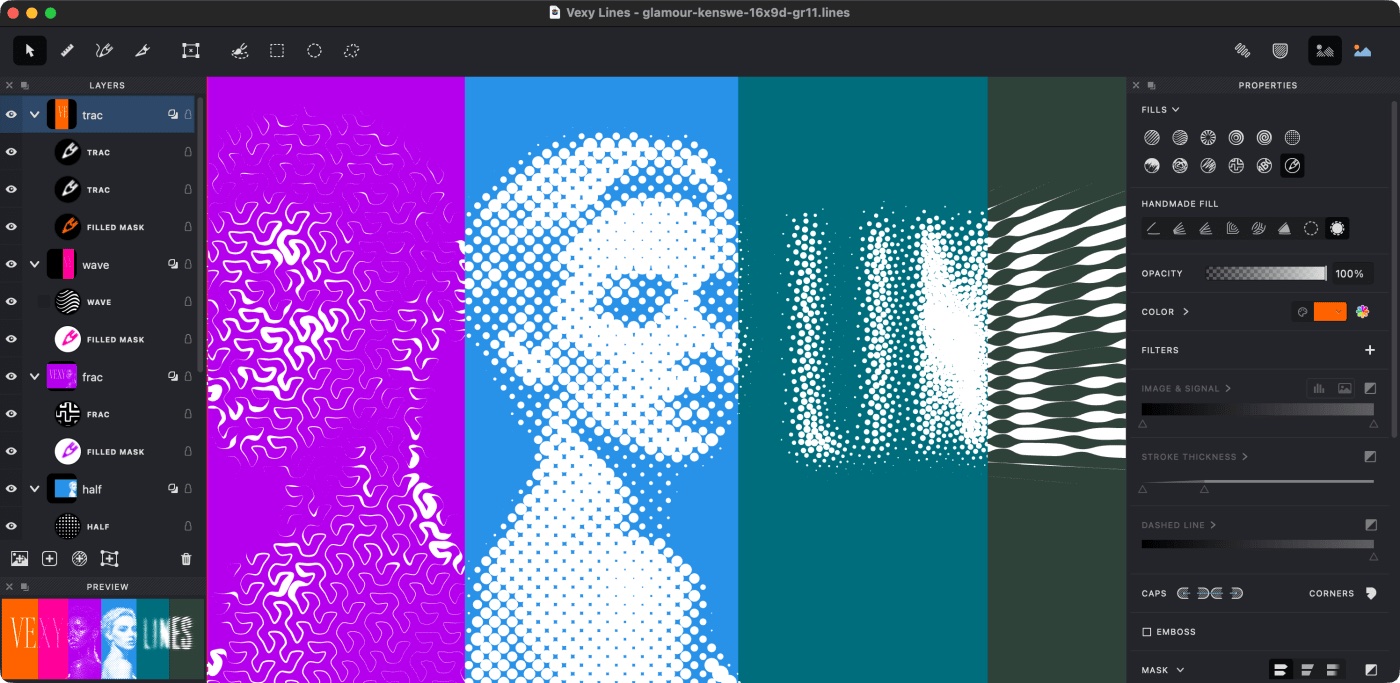
<figcaption>The workspace places the source and its line treatment beside the controls.</figcaption>
</figure><figure markdown="1">
{ loading="lazy" width="960" }
<figcaption>The workspace places the source and its line treatment beside the controls.</figcaption>
</figure>Syntax and variants in MaterialX
Images: authoring details
Lightbox
The image plugin wraps ordinary Markdown images with a lightbox link. Select this specimen to inspect detail, then close it with the close control or Esc. The inline image remains useful when scripting is unavailable.

<p><a class="glightbox" data-desc-position="bottom" data-height="auto" data-type="image" data-width="auto" href="https://res.cloudinary.com/fontlab/image/upload/c_limit,w_960/f_auto,q_auto/vw/68daa71678eede3413b20f4e_fill-linear.png"><img alt="Parallel blue and green strokes demonstrating a Vexy Lines fill" loading="lazy" src="https://res.cloudinary.com/fontlab/image/upload/c_limit,w_960/f_auto,q_auto/vw/68daa71678eede3413b20f4e_fill-linear.png"></a></p>{ loading=lazy }Image alignment
Alignment is for a small image with a short explanatory passage, not a way to force long prose into a narrow channel. The image returns to the available width when there is no room beside it.

The aligned specimen lets a short note refer to an adjacent detail. End the relationship promptly; for a sustained margin composition, use the FontLab aside image pattern.
<p><a class="glightbox" data-desc-position="bottom" data-height="auto" data-type="image" data-width="auto" href="https://res.cloudinary.com/fontlab/image/upload/c_fill,w_360,h_240/f_auto,q_auto/vw/68daa71678eede3413b20f4e_fill-linear.png"><img align="right" alt="A compact blue and green line sample aligned beside this note" loading="lazy" src="https://res.cloudinary.com/fontlab/image/upload/c_fill,w_360,h_240/f_auto,q_auto/vw/68daa71678eede3413b20f4e_fill-linear.png" width="240"></a></p>
<p>The aligned specimen lets a short note refer to an adjacent detail. End the
relationship promptly; for a sustained margin composition, use the FontLab
<a href="../../design/fontlab-patterns/#fl-aside">aside image pattern</a>.</p>{ align=right loading=lazy width=240 }
The aligned specimen lets a short note refer to an adjacent detail. End the
relationship promptly; for a sustained margin composition, use the FontLab
[aside image pattern](../design/fontlab-patterns.md#fl-aside).Image captions
A caption says what the reader should notice or why the image matters. It adds context; it does not replace alternative text.

The line spacing stays legible at the baseline content width.
<figure>
<p><a class="glightbox" data-desc-position="bottom" data-height="auto" data-type="image" data-width="auto" href="https://res.cloudinary.com/fontlab/image/upload/c_limit,w_720/f_auto,q_auto/vw/68daa71678eede3413b20f4e_fill-linear.png"><img alt="Parallel strokes showing how the fill keeps an even visual rhythm" loading="lazy" src="https://res.cloudinary.com/fontlab/image/upload/c_limit,w_720/f_auto,q_auto/vw/68daa71678eede3413b20f4e_fill-linear.png"></a></p>
<figcaption>
<p>The line spacing stays legible at the baseline content width.</p>
</figcaption>
</figure>{ loading=lazy }
/// caption
The line spacing stays legible at the baseline content width.
///Image lazy-loading
Use loading=lazy for non-critical images below the opening view. The browser
may delay the request, but the dimensions, alternative text, and surrounding
layout remain stable.
<p><a class="glightbox" data-desc-position="bottom" data-height="auto" data-type="image" data-width="auto" href="https://res.cloudinary.com/fontlab/image/upload/c_limit,w_720/f_auto,q_auto/vw/68daa71678eede3413b20f4e_fill-linear.png"><img alt="A lazily loaded Vexy Lines detail" loading="lazy" src="https://res.cloudinary.com/fontlab/image/upload/c_limit,w_720/f_auto,q_auto/vw/68daa71678eede3413b20f4e_fill-linear.png" width="480"></a></p>{ loading=lazy width=480 }Light and dark mode
Theme-specific sources are appropriate when one asset cannot remain legible on both surfaces. Both images need equivalent alternative text because only one is visible at a time. FontLab’s theme switcher updates the MaterialX colour scheme, so the matching fragment is selected without page-level JavaScript.


When an illustration remains clear in all five identities, prefer one source. Theme-specific files double the maintenance and accessibility checks, so they should solve a real contrast problem rather than decorate the theme switch.
<p><a class="glightbox" data-desc-position="bottom" data-height="auto" data-type="image" data-width="auto" href="https://res.cloudinary.com/fontlab/image/upload/c_limit,w_720/e_brightness:10/f_auto,q_auto/vw/68daa71678eede3413b20f4e_fill-linear.png#only-light"><img alt="A Vexy Lines sample prepared for a light reading surface" loading="lazy" src="https://res.cloudinary.com/fontlab/image/upload/c_limit,w_720/e_brightness:10/f_auto,q_auto/vw/68daa71678eede3413b20f4e_fill-linear.png#only-light"></a>
<a class="glightbox" data-desc-position="bottom" data-height="auto" data-type="image" data-width="auto" href="https://res.cloudinary.com/fontlab/image/upload/c_limit,w_720/e_brightness:-20/f_auto,q_auto/vw/68daa71678eede3413b20f4e_fill-linear.png#only-dark"><img alt="The same Vexy Lines sample prepared for a dark reading surface" loading="lazy" src="https://res.cloudinary.com/fontlab/image/upload/c_limit,w_720/e_brightness:-20/f_auto,q_auto/vw/68daa71678eede3413b20f4e_fill-linear.png#only-dark"></a></p>
<p>When an illustration remains clear in all five identities, prefer one source.
Theme-specific files double the maintenance and accessibility checks, so they
should solve a real contrast problem rather than decorate the theme switch.</p>{ loading=lazy }
{ loading=lazy }
When an illustration remains clear in all five identities, prefer one source.
Theme-specific files double the maintenance and accessibility checks, so they
should solve a real contrast problem rather than decorate the theme switch.A wider picture
Use the editorial .fl-wide class when the image needs more room than the prose. It retains the image proportions and shrinks with the viewport.
This pattern uses the shared FontLab editorial styles described in Theme and setup.

<p><a class="glightbox" data-desc-position="bottom" data-height="auto" data-type="image" data-width="auto" href="https://res.cloudinary.com/fontlab/image/upload/c_limit,w_auto/f_auto,q_auto,dpr_auto/vw/68daa71678eede3413b20f4e_fill-linear.png"><img alt="Linear fill showing parallel strokes and tone" class="fl-wide" loading="lazy" src="https://res.cloudinary.com/fontlab/image/upload/c_limit,w_auto/f_auto,q_auto,dpr_auto/vw/68daa71678eede3413b20f4e_fill-linear.png"></a></p>{ .fl-wide loading="lazy" }A picture beside the text
Use .fl-aside for supporting media in the desktop margin. Keep the image in a logical source position; on narrow screens it returns to the reading column.
This pattern uses the shared FontLab editorial styles described in Theme and setup.
Line direction and density affect the appearance of the source image. The picture supports this explanation; no instruction depends on its position.
<p><a class="glightbox" data-desc-position="bottom" data-height="auto" data-type="image" data-width="auto" href="https://res.cloudinary.com/fontlab/image/upload/c_limit,w_auto/f_auto,q_auto,dpr_auto/vw/68daa71678eede3413b20f4e_fill-linear.png"><img alt="Linear fill with parallel strokes" class="fl-aside" loading="lazy" src="https://res.cloudinary.com/fontlab/image/upload/c_limit,w_auto/f_auto,q_auto,dpr_auto/vw/68daa71678eede3413b20f4e_fill-linear.png"></a></p>
<p>Line direction and density affect the appearance of the source image. The picture supports this explanation; no instruction depends on its position.</p>{ .fl-aside loading="lazy" }
Line direction and density affect the appearance of the source image. The picture supports this explanation; no instruction depends on its position.An image beyond the text column
The editorial .fl-bleed class extends a substantial picture towards the viewport edge. It requires the shared editorial layout CSS and JavaScript, which measure the available width. Test it in the actual destination shell.
This pattern uses the shared FontLab editorial styles described in Theme and setup.
<p><a class="glightbox" data-desc-position="bottom" data-height="auto" data-type="image" data-width="auto" href="https://i.vexy.art/vl/landing/home-vexy-lines.jpg"><img alt="Vexy Lines workspace and portrait" class="fl-bleed" loading="lazy" src="https://i.vexy.art/vl/landing/home-vexy-lines.jpg"></a></p>{ .fl-bleed loading="lazy" }